Wednesday, 10 March 2021

How to use RabbitMQ


How to use RabbitMQ


Image for post

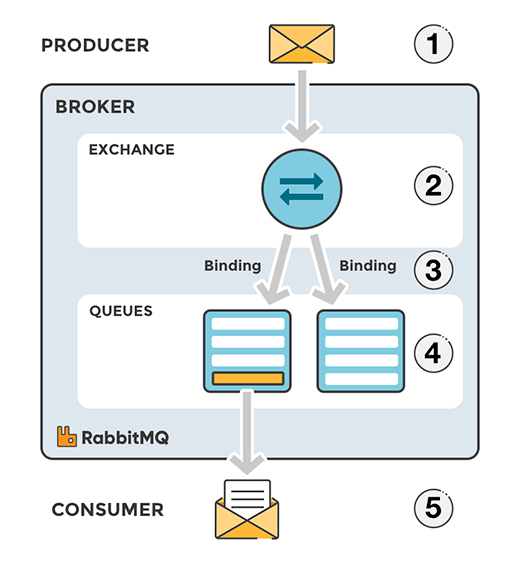
Concepts

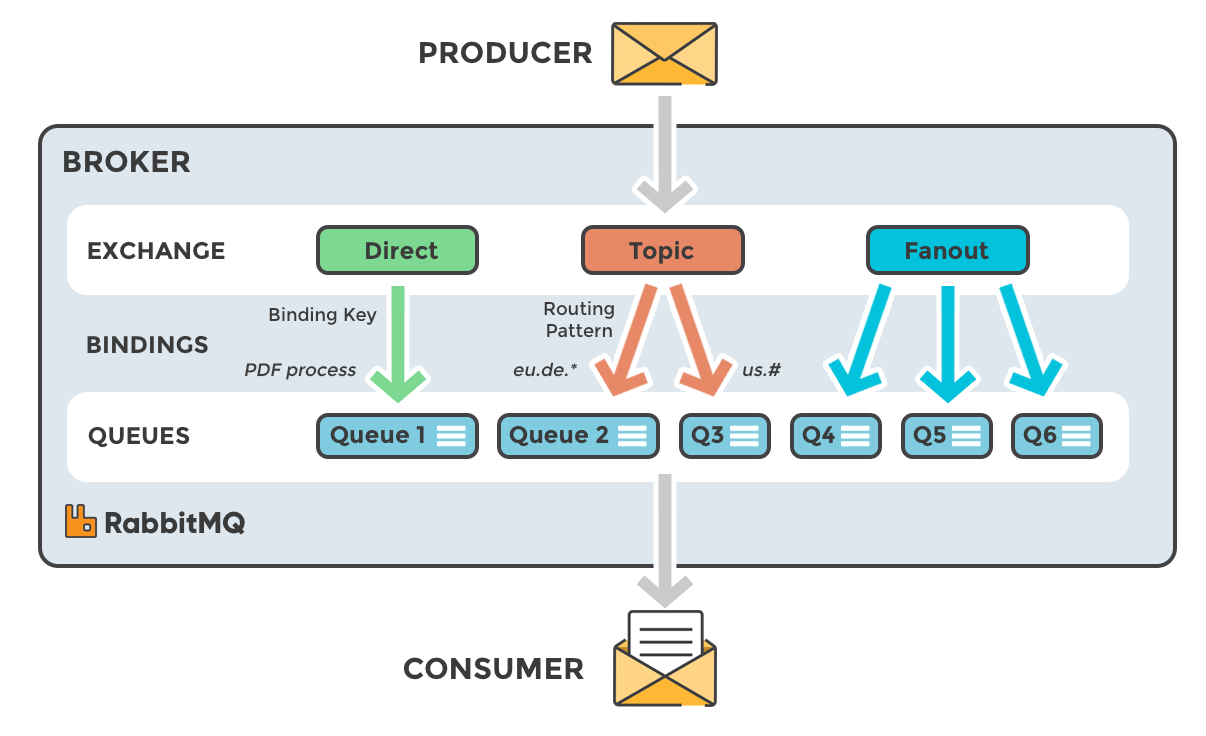
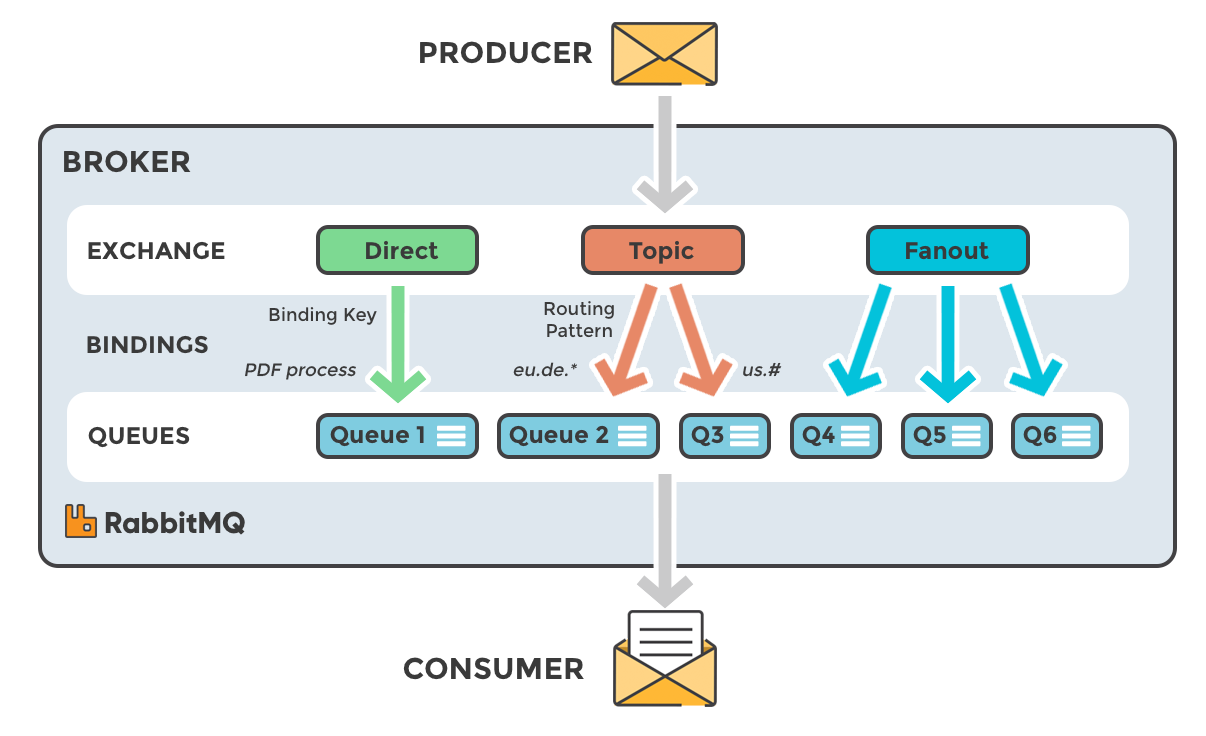
Exchanges

Image for post
Image for post

Publish and subscribe messages

Python publisher with pika

pip install pika
def rabbit_publish():
print("rabbit publish")

params = pika.URLParameters('amqp://guest:guest@localhost:5672')
params.socket_timeout = 5
connection = pika.BlockingConnection(params)

channel = connection.channel() # start a channel
channel.queue_declare(queue='queue1')

data = {
"id": int(datetime.now().timestamp()) % 100,
}

# send a message
channel.basic_publish(exchange='', routing_key='queue1', body=json.dumps(data))
print("[x] Message sent")
connection.close()

Python subscriber with pika

def rabbit_subscribe():
def process(msg):
print("Processing")
data = json.loads(msg)
print(" [x] Received:", data["id"])

time.sleep(3)
print(f"Processing finished: #{data['id']}");
return True

def
callback(ch: BlockingChannel,
method: pika.spec.Basic.Deliver,
properties: pika.spec.BasicProperties,
body: bytes):
if process(body):
ch.basic_ack(method.delivery_tag, multiple=False)

print("rabbit subscribe")
params = pika.URLParameters('amqp://guest:guest@localhost:5672')
params.socket_timeout = 5
connection = pika.BlockingConnection(params)
channel = connection.channel()
channel.basic_consume('queue1', callback, auto_ack=False)

# start consuming (blocks)
channel.start_consuming()
connection.close()

Types of Exchanges

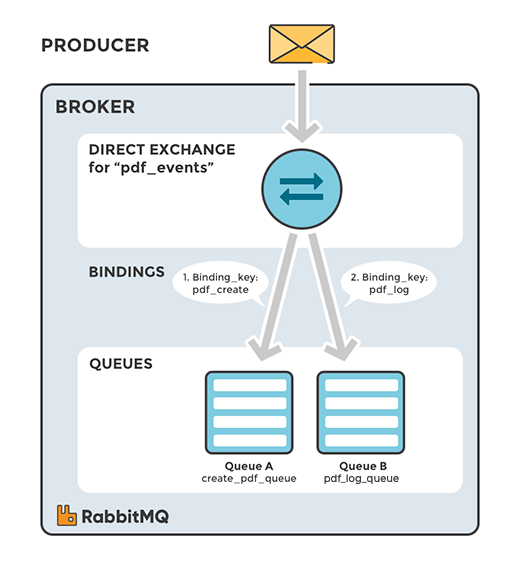
Direct Exchange

Image for post

Default exchange

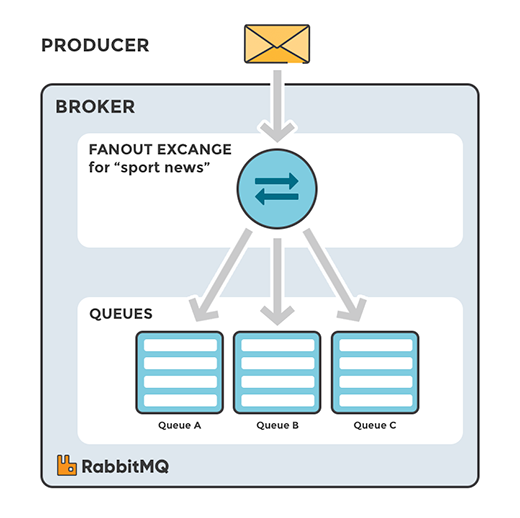
Fanout Exchange

Image for post

Apigee overview for beginner

Apigee overview for beginner

Apigee, which is now a part of Google, is a full lifecycle API platform that accelerates the pace of digital business and empowers organizations to securely deliver and manage all APIs.


et’s start with a basic view of the API management platform in a scenario everyone can relate to in their everyday lives.

We use our smartphones constantly. We open apps, click around, and get responses. We may also do things like log into our banking app and make payments.

All of these pass information from the app to the API management platform that directs the request to the correct location in the company’s backend systems, to then send a response all the way back through the API management platform to your smartphone app.

Hundreds of companies, including Walgreens, Burberry, First Data, Swisscom, and Live Nation — as well as tens of thousands of developers — use Apigee to simplify the delivery, management, and analysis of API.

APIGEE provides us three capability services:

  1. APIGEE Edge
  2. APIGEE Sense
  3. APIGEE Monetization

1. APIGEE Edge:

It is a platform for developing and managing APIs. Simple.

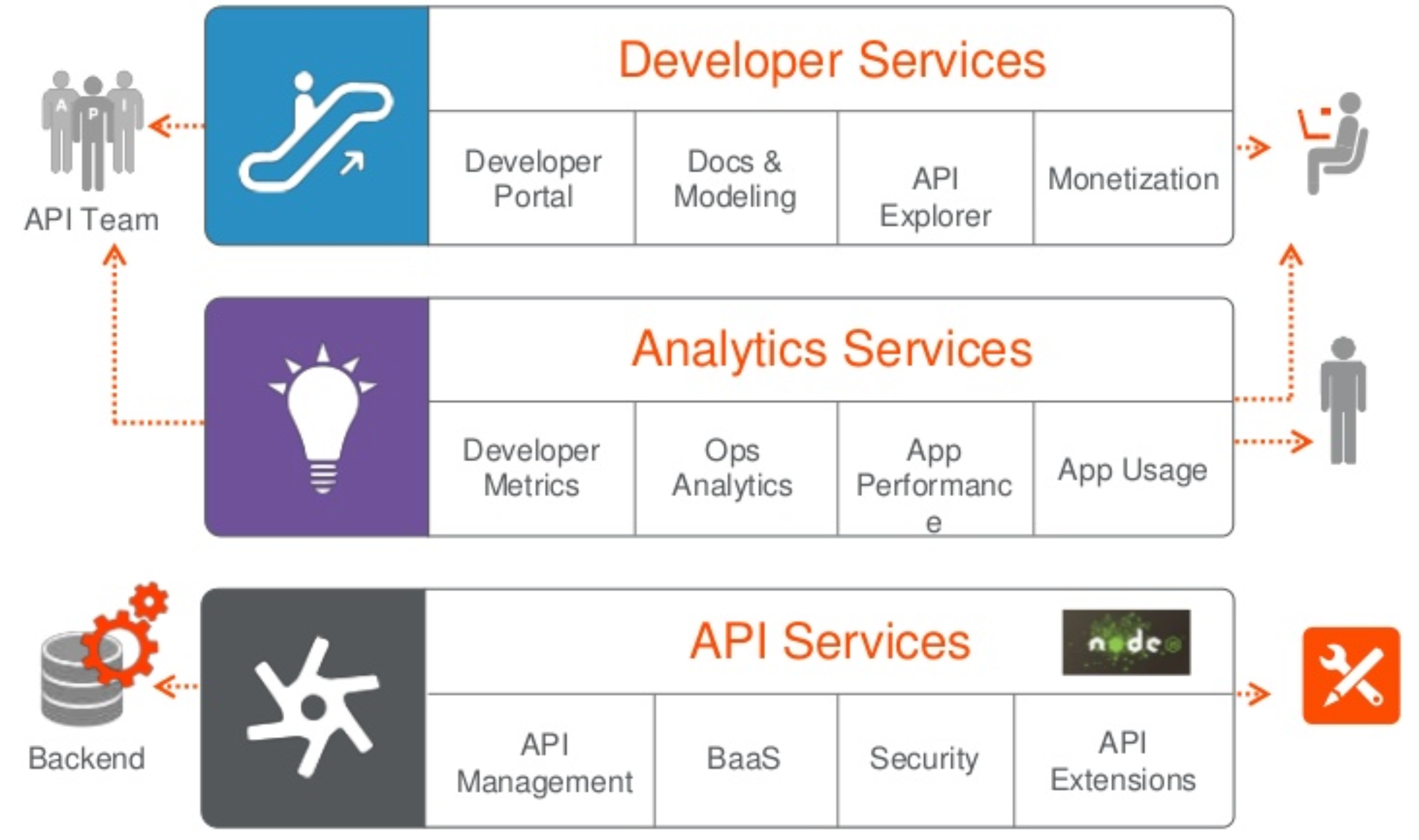
It consists of three layers:

  1. API Service Layer: It is the core area for creating, publishing, and managing your portfolio of API proxies, as well as implementing security access to protect your company’s assets.
  2. Developer Service Layer: It includes areas that integrate with the API management platform to provide developers access and tools to consume APIs which is critical for developers to easily discover, build, and test applications.
  3. Analytics Service Layer: It allows full visibility and details into the health of your program, with details on usage and performance.
Image for post

2. APIGEE Sense:

It is an intelligent behavior detection and security product that protects APIs from attacks.

  1. It protects your APIs from unwanted request traffic, including attacks from malicious clients;
  2. It analyzes API request traffic, identifying patterns that might represent unwanted requests;
  3. It works with Apigee Edge API management platform using algorithms built by analyzing metadata from billions of API calls on a regular basis;
  4. It provides an additional layer of API security by identifying and alerting administrators to suspicious API behaviors, such as content scraping, credential stuffing, compromised keys or tokens, and much more.

3. APIGEE Monetization:

It is a flexible, easy to use solution to realize value from your APIs.

  1. It offers end-to-end monetization capabilities;
  2. It provides us the flexibility to create various revenue models, process payments, and manage building ;
  3. It has robust reporting capabilities;
  4. It has the ability to integrate with your developer portal to manage these plans.

TECHNOLOGY STACK USED WITHIN APIGEE:

Each service has a mixture of Apigee Stack and open source components that talk to each other, performing a specific function.

Within the three major capability services that APIGEE Edge provides, we have below common components:

  1. Gateway: It mainly routes and processes the API
  2. UI: for the enterprise admin
  3. Developer portals: To subscribe to the product and access the APIs
  4. Infrastructure services: It handles the persistence of runtime and analytics data
  5. Management server: It provides APIs for all configurations and management activities.

Within API Services we have the following components:

1. Router: It handles all incoming API traffic and dispatches it to the message processor;

2. Message processor: It executes all the policies for a given specific organization and environment;

3. Management server: It provides APIs for all configurations and management tasks.

4. Enterprise UI: It offers an extended capability.

5. Cassandra: It stores application configurations, API keys, and the OAuth tokens.

6. Zookeeper: It contains service configuration data.

7. OpenLDAP: It contains the organization’s users and their rules.

Within Analytics Service:

1. Qpid server and the Qpid queuing system: It transports the analytics data.

2. Postgres server and the PostgreSQL database: It manages the analytics database.

Within Developer Services:

1. Developer portal: It is used to expose the API documentation.

2. MySQL database: It is used to register external developers and their apps.

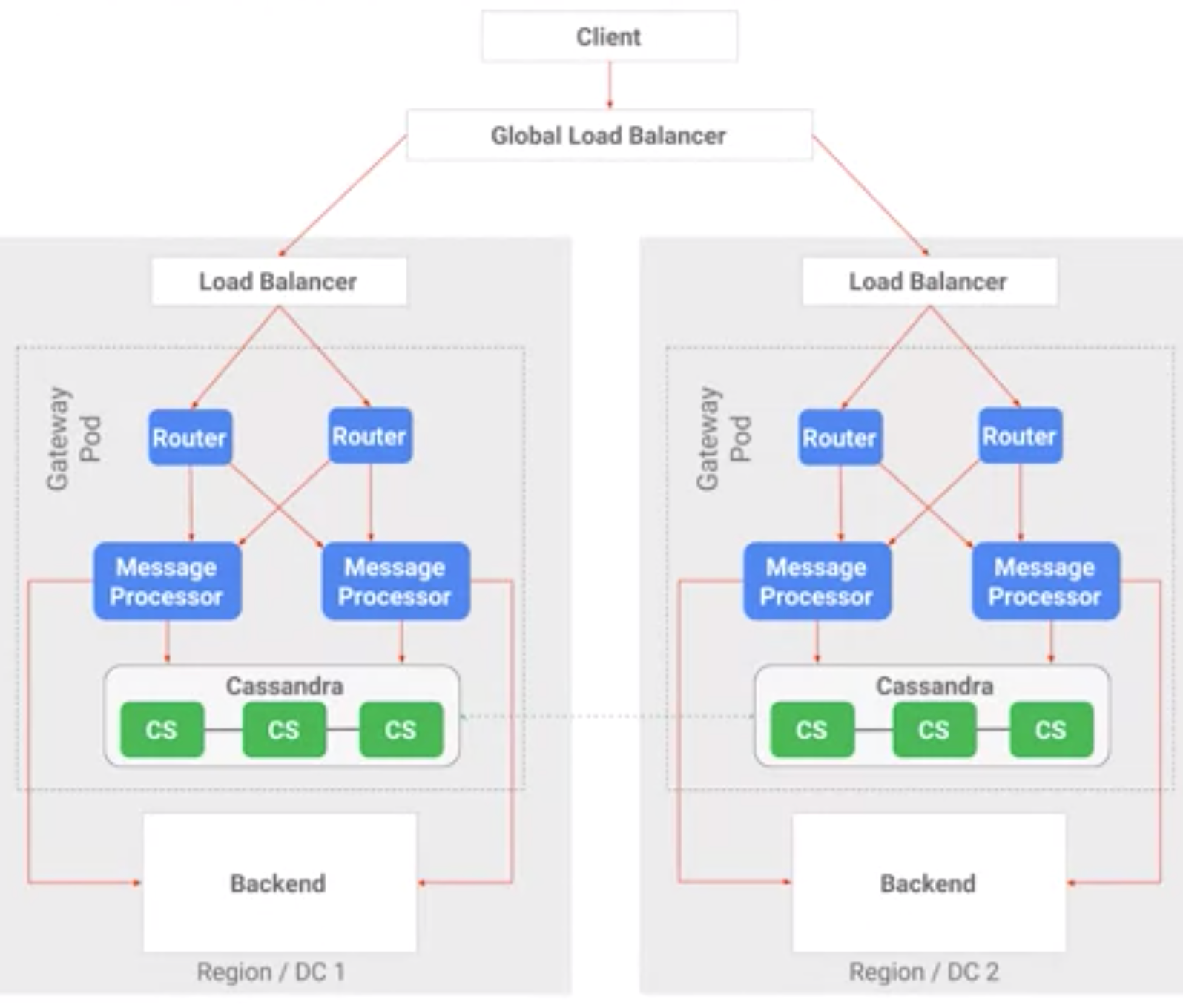
Let’s talk about what happens when an API call is made and the request hits Apigee.

  • The routers receive the request and send them to their message processors.
  • The message processor will then execute the policies within the API proxy implementation and forward the request to the backend system.
  • The message processor interacts with Cassandra for token validation and other policies.
  • The message processor waits for the response from the backend system, processes it, and then sends it back to the client via the router.
Image for post

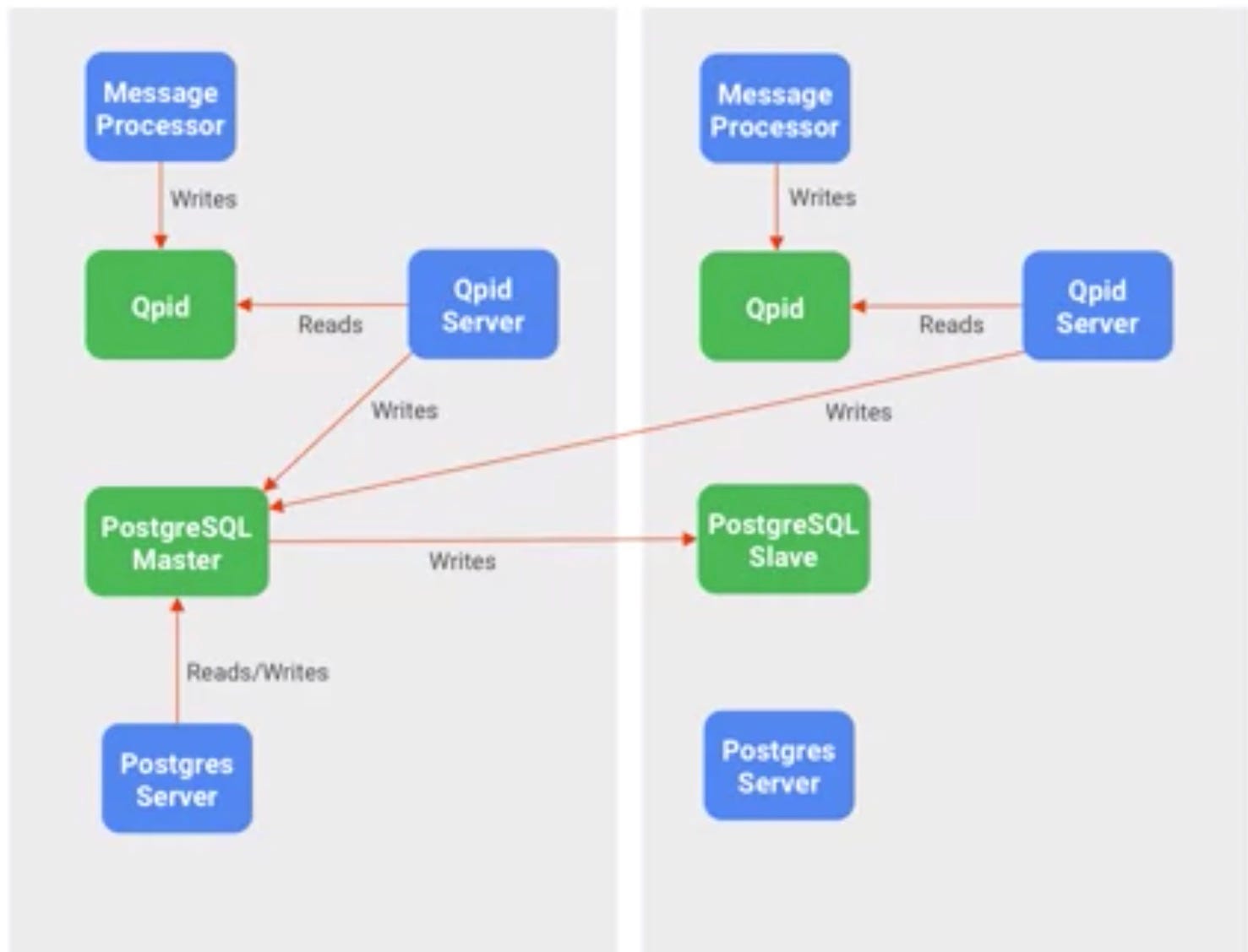
Now let’s understand the analytics flow.

  • The data is generated by the message processor and is asynchronously sent to the Qpid.
  • Qpid server consumes the analytics raw data and writes it onto the PostgreSQL database.
  • Postgres Server aggregates the data, writes it into the PostgreSQL master database, which can be used to query and generate different reports.
Image for post

Friday, 5 March 2021

apigee insallation


Pre-Requisites


For the purpose of the course and the installation of the Apigee API Platform, the following hardware and software is required:

  • 6 Cloud instances, virtual machines or physical services with 4 core and 4 GB RAM, 100 GB disk.
  • All instances should contain recommended OS: https://docs.apigee.com/release/supported-software
  • All instances should be on the same network zone and allow connectivity between them.
  • Internet Browser and SSH client are required for the labs.

In order to proceed with the course, you will need the Apigee OPDK software and valid install key. If your organization already have a license key you should use it for this class, if you don't have one already, please send a license request to apigee-coursera-license@google.com. Please use your Coursera log in email address in the request. You will have to accept Apigee's terms and conditions before a license can be generated and the process may take a few days.


you will receive an overview of the Apigee platform. 

APIs is allow you to connect applications to resources hosted on your back end systems. 
These APIs are deployed, 
and managed by an API management platform. 
A typical enterprise offers multiple connected digital experiences to their customers. 
These experiences are powered by a diverse set of applications. 
Applications range from mobile apps 
to third party systems owned by partners or customers. 
These applications often come with 
different requirements such as different types of data representation, 
different security models, and others. 
Expectations around these connected experiences are driven by business oriented KPIs. 
These KPIs typically require agility, 
faster time to market, 
and tailored user experiences. 
On the other hand, we have back end systems. 
The SLAs of back end systems depend on high availability, 
change control, and configuration management. 
The gap between the expectations of connected digital experiences, 
and back end systems often creates friction which 
results in a slow pace of change and lack of agility in most organizations. 
This disconnect is often described as two speed IT. 
Apigee helps to bridge the gap. 
APIs is deployed on Apigee can be used to break 
dependencies between applications and back end systems. 
APIs represent products that need to be managed. 
Apigee provides both API runtime execution and API product management. 
Breaking dependencies between applications and back end systems through 
API management with Apigee allows for faster innovation, 
the creation of tailored user experiences, and greater agility. 
At the same time, Apigee provides the availability, 
scalability, and security that enterprises demand. 
As we work to understand the role of an API management platform, 
it is important to understand the types of interactions API facilitate, 
and the stakeholders of these interactions. 
The Digital Value Chain captures these ideas. 
We read the Digital Value Chain from left to right. 
Companies want to provide customers with connected user experiences. 
These connected experiences are powered by applications. 
Applications are built by developers. 
Developers require access to resources and 
data which are exposed by companies through APIs. 
API products are built and managed by API teams. 
API teams coordinate with back end systems to consume data while 
creating API that meet the expectations of end users, and application developers. 
The Digital Value Chain illustrates not only the interactions that API facilitate, 
but also the key actors. 
It represents a reminder of the capabilities that an API platform should provide. 
With that understanding, let's explore Apigee's core capabilities. 
At a high level, Apigee Edge has three core capabilities. 
API services provide features related to API management and runtime execution, 
building and deploying API proxies as well as the execution of flows 
and policies within those proxies falls under API services. 
Developer services provide a collection of features to enable 
the interaction between the people consuming the APIs and those producing APIs. 
Developer portal and monetization are key for API adoption. 
Apigee provides rich and flexible 
analytics capabilities that can help address questions by business users, 
developers, and operations teams. 
APIs are products, managing products requires a clear understanding of their performance, 
adoption, and overall behavior. 
Using Apigee Edge, you can create API proxies. 
A proxy is a collection of XML files and resources that 
allow you to describe the request and response flow of an API call. 
Policies represent the building blocks of API proxies. 
They can be attached to specific points on the request and response flow, 
allowing you to model the behavior of 
a given API call Apigee Edge offers policies related to traffic management, 
mediation, and security as well as extensions. 
The developer portal provides a communication channel. 
It is how the team producing APIs that can 
interact with the developers consuming those APIs. 
The developer portal allows you to publish API specifications and relevant documentation. 
The portal provides developer self-service for 
registering applications and subscribing to API products. 
It facilitates API key distribution, 
and exposes application specific analytics. 
Monetization is a flexible, 
easy to use solution to realize the value of your APIs. 
Monetization allows you to create different revenue models, 
manage billing, and process payments. 
Monetization integrates with your developer portal 
allowing you to offer and manage plans for your API products. 
Apigee's analytics allow you to capture and visualize 
contextual data related to API execution, 
interactions between APIs and back-end systems, 
developers and their apps, 
error rates, performance, and latency and customer reporting. 
Apigee Edge exposes all of its functionality through APIs. 
Those APIs can be used for development as well as operational tasks. 
For example, you can deploy APIs, 
create users, and run analytics reports using APIs. 
The management API is consumed by the Apigee Edge enterprise 
UI as well as the installation and upgrade processes. 
You can use the management API for offline development, 
CICD automation, and other operational activities. 
By now, you should have a high level understanding of 
Apigee's core capabilities and its place within the enterprise. 

is critical to your understanding of Apigee Edge for private cloud as a whole. 
In this lesson, we will focus on building that understanding. 
Over the next few minutes, 
we will be covering Apigee Edge capabilities, 
how each component fits into the platform, 
and details about the underlying technology stack. 
Apigee Edge has three core functional areas: API services, 
developer services, and analytic services. 
On the diagram, Apigee capabilities are shown in blue, 
open source capabilities are green, 
items in grey represent customer-specific infrastructure and API clients. 
Apigee capabilities such as Gateway and analytics, 
rely on underlying open source infrastructure 
to support the storage and replication of data. 
The Gateway sits on the critical path. 
Components included in this capability represent the runtime for APIs deployed on Apigee. 
Apigee Edge is horizontally scalable. 
For most scenarios, adding capacity to handle 
more API calls is as simple as adding additional Gateways. 
At some point, scaling the Gateway horizontally may require scaling 
the supporting infrastructure to handle 
the additional data being generated by the system. 
Components associated with other capabilities such as the UI, 
system management and the developer portal, 
only need to scale based on requirements associated with those capabilities. 
Horizontal scalability applies to capabilities within the region, 
as well as across regions. 
By design, Apigee Edge is active active. 
By that, we mean there is 
continuous eventually consistent data replication 
across data stores located in all regions. 
There are two regions in this diagram. 
API traffic is channeled to one or both regions based on customer preferences, 
that is usually handled by a global load balancer or DNS resolution. 
Regions are independent of each other. 
API calls and runtime execution have affinity with the region in which they arrive. 
Once an API call arrives at a gateway, 
it will stay in the region where the gateway is located. 
Take a moment to internalize the concepts discussed so far, 
as they are key to your understanding of the Apigee Edge architecture. 
As we discussed this diagram, 
think about the blue and green boxes as services or components. 
For now, we will focus on the components responsibilities. 
Later on, we will discuss the relationship as 
well as how to group them to form installation topologies. 
Let's start with the critical path. 
On this diagram, the critical path is represented by 
the horizontal line extending from the client to the backend system. 
The first component on the critical path is the router. 
The router is responsible for exposing 
virtual hosts and load balancing incoming requests. 
The message processor represents the runtime container for APIs executed on Apigee. 
API calls executing on 
the message processors may perform one or more calls to backend systems. 
All calls to backend systems on Apigee are originated by message processors. 
Some APIs generate runtime data that needs to be stored within Apigee. 
API policies such as API key validation, OAuth, 
key value map, and cache require 
access to a data store for the storage and retrieval of runtime data. 
The Apigee runtime data store is cassandra. 
Cassandra is part of the critical path because it is used by 
API policies to store data during runtime execution. 
The full critical path consists of the router, 
message processor, and cassandra services. 
As long as these components are up and running, 
others can be down or unreachable without affecting API runtime availability. 
API calls executed on the message processors generate analytics events. 
These events are asynchronously generated and consumed. 
The analytics pipeline is described on the bottom right part of the diagram. 
The first component in the analytics pipeline is apache Qpid. 
Qpid is a queue broker, 
queues are provisioned here to store analytics data. 
Qpid server is responsible for moving data from Qpid queues to postgreSQL. 
Analytics raw data on postgreSQL are eventually 
aggregated in batches by a service called postgres server. 
Aggregate data are used to power some Apigee Edge analytics reports. 
On the left of the diagram, 
we find the management components. 
At the center of the section is the management server. 
The management server exposes the management API. 
This API allows you to add users, 
deploy APIs, and perform many other actions. 
While performing these actions, 
the management server leverages cassandra, zookeeper, 
and openldap to read and store 
relevant data associated with runtime or configuration state. 
Zookeeper stores data related to the configuration of the system. 
The wiring information between 
components and configuration state are stored in zookeeper. 
Openldap stores information related to role-based access control users, 
roles, and permissions used for administrative access to Apigee are stored here. 
The Enterprise UI is the administrative UI used by API teams to develop and manage APIs. 
This UI consumes the management API to perform all actions. 
All features in the Enterprise UI are available through the management API. 
At the bottom of the diagram, 
we find the developer portal. 
This portal is a Drupal based application. 
Drupal uses postgreSQL to store data about user accounts, sessions, and modules. 
Take some time to review the component diagram in detail, 
your understanding of how Apigee Edge components function and relate to 
each other is key to your understanding and management of the platform. 
For more information on this topic, 


What is the difference between the Rate Limit and Quota policies?

  The   Rate Limit   and   Quota policies   in Apigee serve similar but distinct purposes: Rate Limit: • Limits the number of requests withi...